Managing bill of materials and related lists


Electrical diagrams and design in AutoCAD
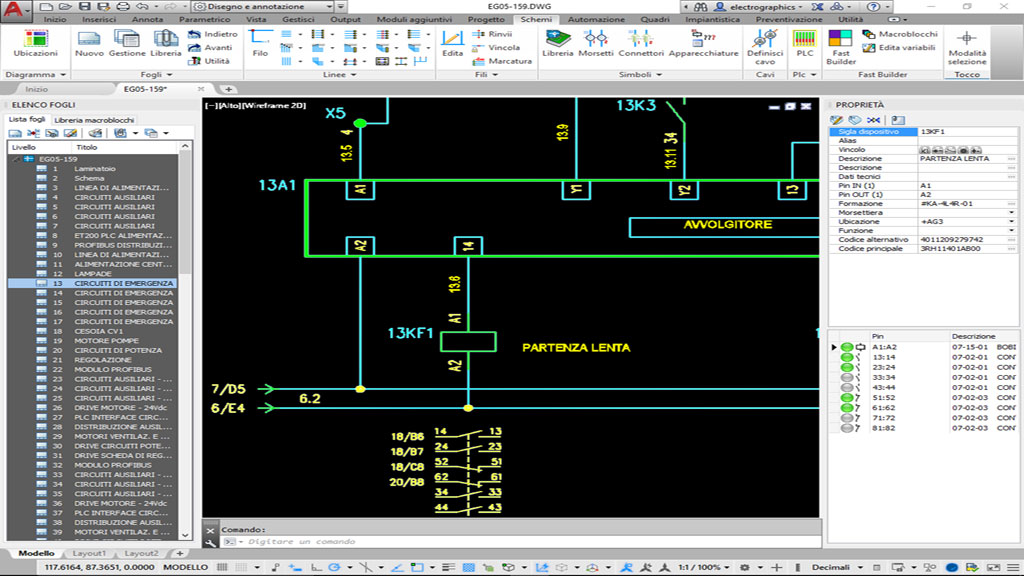
CADelet Professional is the complete package for electrical design in AutoCAD. It allows the complete development of electrical project, from required design to implementation and management of diagrams of any kind.
AutoCAD 64-bit rel. 2018 to 2026 required New
Main features
The features of CADelet Professional: each item opens the detailed description.
To compare CADelet Professional with the other software, see the products comparison table.
What's new
The new features of CADelet Professional, series by series.
System requirements
Minimum requirements to install and use CADelet Professional.
- Computer with 3 GHz o higher processor.
- At least 8 GB RAM.
- Hard disk with at least 10 GB free space.
- Colour video and graphics board (SVGA or higher).
- USB, mouse, printer or plotter.
- Windows 10 (version 1809 or higher) or 11.
- 64-bit AutoCAD version 2018-2025.
Integrations
Electro Graphics software that completes CADelet Professional.
These Electro Graphics software products integrate with CADelet Professional to complete the set of tools needed for professional electrical engineering.

Managing cables connection and wiring lists

Calculation of LV/MV electrical grid according to international standards

Management of variants, options and accessory parts of diagram

Design of grid-connected and stand-alone photovoltaic systems
Other electrical CAD
Other Electro Graphics solutions in the same field.
In addition to CADelet Professional, other electrical CAD solutions are available: software that runs on Autodesk AutoCAD, or which includes Autodesk AutoCAD technology engine.

Wiring diagram for industrial automation in AutoCAD
Drawing and engineering electrical system in AutoCAD

CAD for electrical engineering, both, automation and electrical systems

CAD for electrical engineering, both, civil and industrial systems
Products comparison table
The features of the Electro Graphics software compared side by side.
News